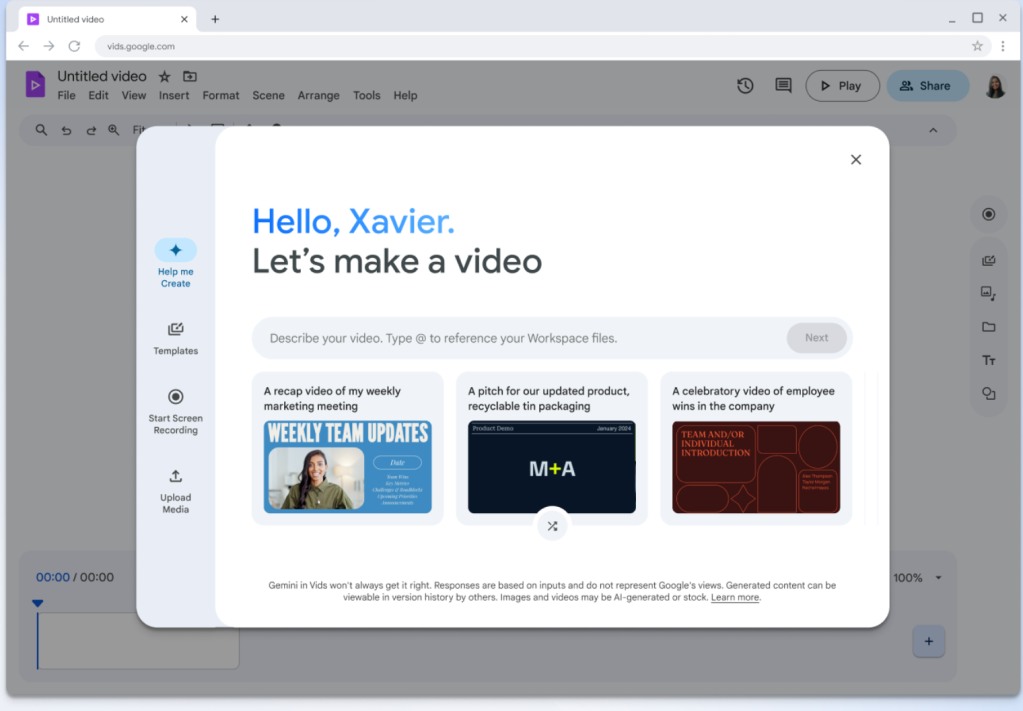

Google has rolled out a user-friendly update to Google Drive, introducing a dedicated “Vids” shortcut button that streamlines video editing for users—eliminating the need to switch between Drive and separate video tools. Launched globally on August 22, 2025, the feature lets Drive users edit stored videos directly within the platform using Google’s Vids (a lightweight, web-based video editor) with just one click. For teams, educators, and casual users who frequently work with video content (like meeting recordings, tutorial clips, or project updates), the shortcut cuts down on workflow friction and makes basic editing tasks—such as trimming, adding text, or inserting transitions—faster and more accessible.
How the Vids Shortcut Works: Seamless Editing Within Drive
The new shortcut is designed to integrate seamlessly into Drive’s existing interface, removing the hassle of downloading videos or navigating to external tools. Here’s a step-by-step breakdown of its functionality:
- Accessing the Shortcut: When a user uploads a video to Drive (or selects an existing video file), a new “Edit with Vids” button appears alongside standard options like “Share” or “Download” (located in the top toolbar or right-click menu).
- One-Click Opening: Tapping “Edit with Vids” automatically opens the video in Google Vids’ editor—no manual file transfers required. Drive preserves the video’s original quality, and all edits are saved back to Drive in real time (users can choose to save edits as a new file or overwrite the original, preventing accidental data loss).
- Simplified Editing Tools: Vids’ editor, tailored for quick tweaks rather than professional-grade production, offers core features optimized for Drive users:
- Trimming & Splitting: Sliders to cut unwanted footage (e.g., the first 30 seconds of a meeting recording) or split videos into shorter clips.
- Text & Annotations: Add titles, captions, or callouts (with customizable fonts and colors) to clarify key points in tutorials or presentations.
- Transitions & Music: Basic transitions (e.g., fades) and a library of royalty-free background music to polish clips for sharing.
- Collaborative Edits: Multiple users can edit the same video simultaneously (with comment and suggestion modes), just like in Google Docs—ideal for team projects or group feedback.
Why This Matters: Fixing a Longtime Drive Pain Point
Prior to the shortcut, Drive users faced a frustrating workflow for video editing: they would have to download videos from Drive, edit them in a separate tool (like iMovie, Adobe Premiere Rush, or even Vids itself), then re-upload the edited version to Drive. This process wasted time, risked version confusion (e.g., multiple copies of the same video), and created barriers for users unfamiliar with complex editing software.
Google’s internal data highlights the need for the update: in 2024, over 45% of Drive users who stored videos reported “editing-related friction” as a top complaint, and 30% said they avoided editing Drive videos altogether due to the cumbersome process. For specific user groups, the shortcut solves unique challenges:
- Educators: Can quickly trim lecture recordings to focus on key topics or add captions for accessibility, then share the edited video directly from Drive with students.
- Remote Teams: Can collaboratively edit meeting recaps or project updates without switching between apps, ensuring everyone works from the latest version.
- Casual Users: Can polish personal videos (e.g., a family event clip) without learning advanced tools, making Drive a more all-in-one storage and editing solution.
How It Compares to Other Video Tools
The Vids shortcut isn’t meant to replace professional editing software like Adobe Premiere Pro or Final Cut Pro—it’s targeted at users who need quick, basic edits. However, it stands out from other lightweight tools (like YouTube Studio or Apple’s QuickTime) by virtue of its deep Drive integration:
- Unlike YouTube Studio (which requires uploading videos to YouTube first), the Vids shortcut lets users edit videos directly in Drive, keeping content within their existing storage ecosystem.
- Unlike QuickTime (which is limited to Apple devices and lacks collaboration features), Vids is web-based, works across all operating systems, and supports real-time team editing.
Google also notes that the shortcut leverages Drive’s sharing permissions: if a user has “edit access” to a Drive video, they automatically have access to edit it in Vids—no extra permission setup needed. This simplifies collaboration for teams that already use Drive for file sharing.
Future Updates and Availability
The “Edit with Vids” shortcut is available now to all Google Workspace users (Free, Basic, Business, and Enterprise tiers) and personal Google Account holders. Google has teased additional enhancements for early 2026, including:
- AI-Powered Editing Suggestions: Vids will automatically recommend edits (e.g., “Trim silent footage at the start” or “Add captions for spoken dialogue”) based on video content, saving users even more time.
- Template Library: Pre-built templates for common video types (e.g., “Meeting Recap,” “Product Tutorial,” “Class Announcement”) to help users structure edits quickly.
- Integration with Google Meet: The ability to edit Meet recordings directly in Drive via the Vids shortcut immediately after a meeting ends, skipping the need to wait for the recording to process.
Getting Started with the Vids Shortcut
For users eager to try the feature:
- Open Google Drive and locate a video file (supported formats include MP4, MOV, AVI, and WMV).
- Select the video—either click on it once or right-click to open the menu.
- Click the “Edit with Vids” button (look for the Vids logo: a small film reel icon).
- Use Vids’ editing tools to trim, add text, or collaborate—edits will save back to Drive automatically.
Early user feedback has been positive. A high school teacher in Chicago said, “I used to spend 20 minutes downloading, trimming, and re-uploading lecture clips. Now it takes 2 minutes with the Vids shortcut—more time for lesson planning, less time on tech.” A remote team manager added, “Our team edits project update videos together now—no more emailing versions back and forth. It’s made Drive feel like a true workspace, not just a storage folder.”
With the Vids shortcut, Google is making Drive more than just a place to store files—it’s turning it into a hub for creating and refining content. For users tired of juggling multiple tools to edit videos, the update is a welcome simplification that puts basic editing power right where their videos live. As Google continues to integrate its productivity tools, this shortcut is a sign of a broader shift toward seamless, all-in-one workflow solutions.